
How I Automated My GitHub Profile (And You Can Too)
Table of Contents
Keeping a GitHub profile updated is tedious. New blog post? Update the profile. New newsletter issue? Update the profile. Made a video? Same thing.
I publish content across multiple platforms: my blog at nickyt.co, my newsletter at OneTipAWeek.com, videos from my YouTube channel, work videos and videos where I’ve been a guest. I got fed up with manual updates so I decided to automate it a couple of years ago.
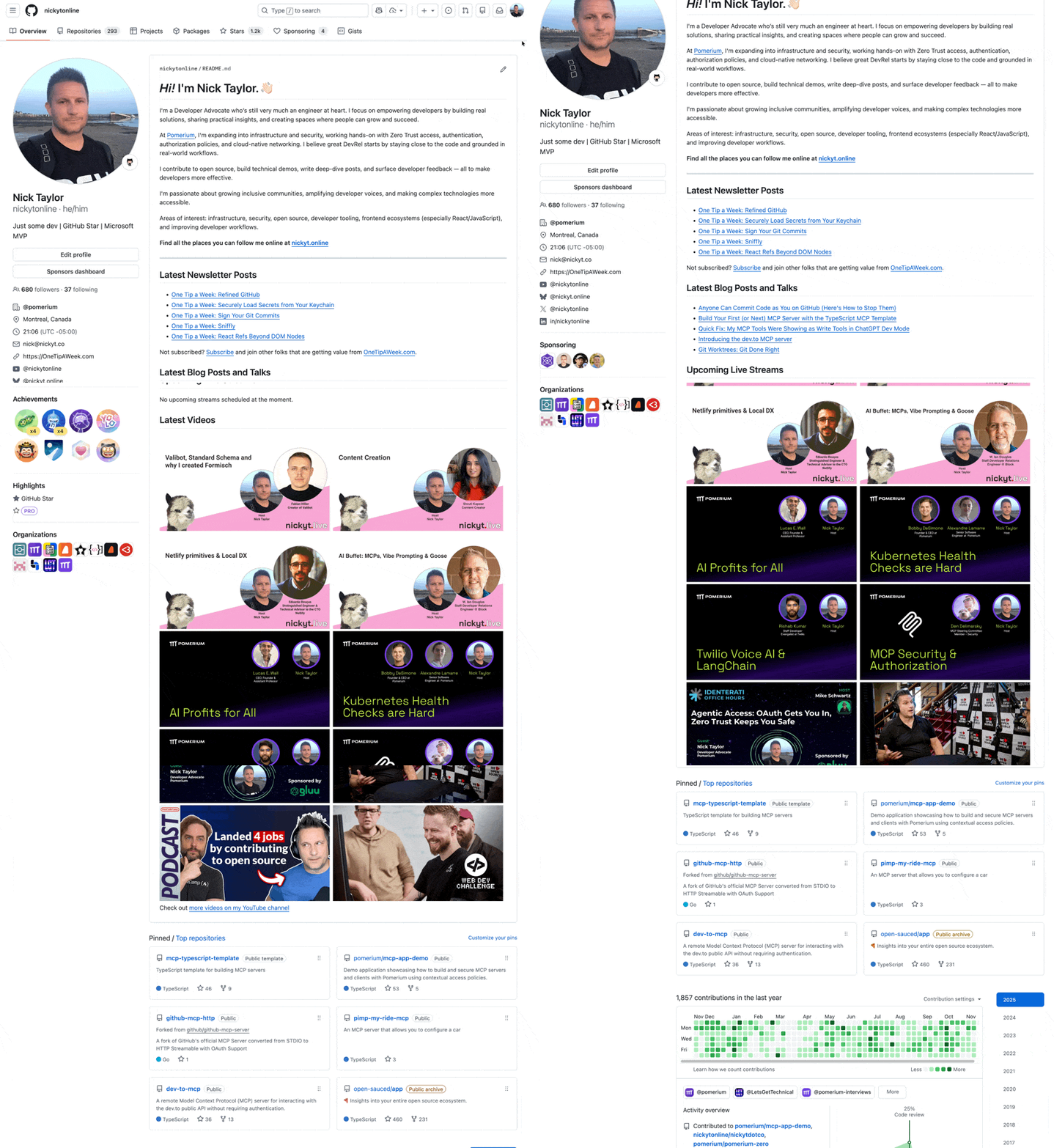
My GitHub profile at github.com/nickytonline now stays current automatically, pulling in my latest content without me lifting a finger. Here’s how I built it.
The GitHub Special Repository#
First, the basics. GitHub has this neat feature where if you create a public repository with the same name as your username, e.g. nickytonline/nickytonline, it becomes a special profile repository where the README.md in the repo displays directly on your profile page.
You can follow GitHub’s official guide to set this up, but the basic steps are:
- Create a new public repository named exactly like your username
- Make sure to check “Add a README file” when creating it
- Edit the README.md to include your profile content
Most people know this part and stop there with static content. What fewer people realize is how powerful it becomes when you combine it with GitHub Actions.
My Setup#
My profile showcases three types of dynamic content:
- Latest blog posts from my site
- Recent newsletter issues from One Tip a Week
- Videos from:
All of this updates automatically. I write the content, publish it, and it appears on my GitHub profile.
GitHub Actions to the Rescue#
The automation happens through GitHub Actions’ workflows. Scripts run, update the README, and git commits the changes directly to the main branch. Let me show you the three workflows I use.
For RSS feeds, I use the blog-post-workflow by Gautam krishna R. This requires no additional scripting.
For newsletter posts:
name: Latest Newsletter Postson: schedule: # 1pm UTC on Mondays - cron: '0 13 * * MON' workflow_dispatch:
jobs: update-readme-with-blog: name: Update this repo's README with latest blog posts runs-on: ubuntu-latest steps: - uses: actions/checkout@v2 - uses: gautamkrishnar/blog-post-workflow@master with: feed_list: 'https://rss.beehiiv.com/feeds/NggVbrRMab.xml' comment_tag_name: 'NEWSLETTER-POST-LIST'For blog posts:
name: Latest content I make workflowon: schedule: # Runs every day at midnight UTC - cron: '0 0 * * *' workflow_dispatch:
jobs: update-readme-with-blog: name: Update this repo's README with latest blog posts runs-on: ubuntu-latest steps: - uses: actions/checkout@v2 - uses: gautamkrishnar/blog-post-workflow@master with: feed_list: 'https://www.nickyt.co/feed'For YouTube videos:
For YouTube videos I have a custom workflow that leverages the YouTube API, pulls in my latest video content and then commits the changes directly to main.
name: Update readme videoson: schedule: # Runs every Monday at 1pm UTC - cron: '0 13 * * 1' workflow_dispatch:
jobs: update_profile_data: name: Update readme videos runs-on: ubuntu-latest environment: all steps: - uses: actions/checkout@v2 - name: Setup Node.js uses: actions/setup-node@v4 with: node-version: '22' - name: Update README env: YOUTUBE_API_KEY: ${{ vars.YOUTUBE_API_KEY }} run: | cd scripts npm install node --experimental-transform-types update-readme.ts - name: Commit changes id: commit env: GITHUB_TOKEN: ${{ secrets.GITHUB_TOKEN }} run: | git config user.name "GitHub Actions Bot" git config user.email "<>" git pull origin main git add . if [[ -n "$(git status --porcelain)" ]]; then git commit -m "Update README" git push origin main fiEach workflow runs on a different schedule, but whenever it runs, my GitHub Profile gets updated, if there’s new content for that particular type of content.
Leveraging the GitHub Actions Ecosystem#
There’s a huge ecosystem of GitHub Actions available in the GitHub Actions Marketplace. The blog-post-workflow action is just one example of how you can leverage existing solutions instead of writing everything from scratch.
Before you write a custom workflow/script, check the GitHub Actions Marketplace to see if someone has already solved your problem.
The README as a Template#
We pair our automations with our README.md from the special repo which acts as a template with specific placeholder sections. Here’s how my README is structured:
# Hi! I'm Nick Taylor. 👋🏻
[Static bio content here...]
## Latest Newsletter Posts
<!-- NEWSLETTER-POST-LIST:START --><!-- NEWSLETTER-POST-LIST:END -->
## Latest Blog Posts and Talks
<!-- BLOG-POST-LIST:START --><!-- BLOG-POST-LIST:END -->
## Upcoming Live Streams
<!-- STREAM-SCHEDULE:START --><!-- STREAM-SCHEDULE:END -->
## Latest Videos
<!-- VIDEO-LIST:START --><!-- VIDEO-LIST:END -->Each section between the HTML comments gets automatically replaced by the content generated by the GitHub Actions. The blog-post-workflow action looks for the default <!-- BLOG-POST-LIST:START --> and <!-- BLOG-POST-LIST:END --> comments, but you can customize this with the comment_tag_name parameter like I do for my newsletter section (NEWSLETTER-POST-LIST).
The static content (your bio, contact info, etc.) stays untouched, while the dynamic sections get updated automatically.
As a content creator, I publish a newsletter issue, video or blog post and boom! My GitHub profile is updated. I’m not tied to manually maintaining content in multiple places. I focus on creating good content, and the automation handles distribution.
Getting Started#
If you want to build something similar:
- Create your special profile repository. Create a public repository named exactly like your username, e.g. https://github.com/nickytonline/nickytonline
- Add placeholder sections to your README where dynamic content will go
- Start with one content type (blog posts are usually easiest)
- Build a simple script to fetch and format data, or use an existing action like gautamkrishnar/blog-post-workflow
- Set up a GitHub Action to run it on a schedule
Wrapping Up#
With automations in place, your profile stays current automatically instead of being a snapshot from whenever you last remembered to update it.
It’s been a couple years now and my GitHub profile is always up to date. I never think about it.
If you’re publishing content regularly, this kind of automation is worth setting up. Check out my special repository if you want to steal the whole setup.
If you want to stay in touch, all my socials are on nickyt.online.
Until the next one!
Photo by Homa Appliances on Unsplash